

Valve Steam Controller Key Takeaways
The Valve Steam Controller is an experimental PC gamepad that blends traditional buttons with trackpads and deep software customization.
Where the Valve Steam Controller Fits in Modern PC Gaming
The Valve Steam Controller review story is unusual: this gamepad launched with bold promises, gained a cult following, and then quietly left production. Yet on PC forums and second-hand marketplaces, it still sparks heated debate.
Rather than copy the layout of an Xbox or DualShock pad, Valve tried to solve a different problem: how to make keyboard-and-mouse-centric PC games playable from the couch. The result is a controller that feels half gamepad, half experimental input device. When it works, it can be brilliant. When it does not, it can feel fussy and overengineered.
If you are wondering whether the Valve Steam Controller still makes sense in 2025 and beyond, it comes down to your tolerance for tinkering and your preferred game genres.
Design and Build Quality of the Valve Steam Controller
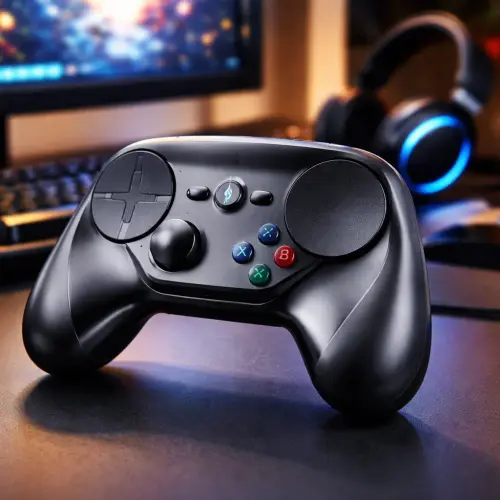
At first glance, the Valve Steam Controller looks familiar yet strange. The broad plastic shell and ABXY buttons are recognizable, but the twin circular trackpads immediately set it apart from mainstream pads.
Form factor and ergonomics
In the hand, the controller is larger than a standard Xbox pad, with a slightly wider grip. Some users with smaller hands find the reach to certain buttons awkward, especially at first. The curved back houses the battery bays and the distinctive rear paddles, which double as extra programmable inputs.
The weight balance is decent once the batteries are installed, but it does not feel as dense or premium as an Xbox Elite or PlayStation DualSense. Materials and finish are functional plastic rather than luxury.
Buttons, paddles, and feedback
Face buttons are clicky and responsive, though their placement higher on the face can feel unusual coming from other controllers. The analog stick is serviceable but clearly not the star of the show. Instead, the capacitive trackpads steal attention, supported by strong haptic feedback that simulates clicks and resistance.
The rear grip paddles are a highlight. They offer extra bindings without forcing you to leave the sticks or pads, great for actions like jump, reload, or push-to-talk. Durability overall is acceptable, but the controller does not have the rugged, tank-like feel of high-end pro controllers.
Steam Controller Unique Features and Control Scheme
The Steam Controller unique features are what make it compelling for some and frustrating for others. Instead of simply offering buttons and sticks, Valve built a flexible input system designed to emulate mouse, keyboard, and standard controller layouts.
Dual trackpads and mouse emulation
The most radical feature is the pair of high-resolution trackpads. The right pad typically acts as a mouse, enabling precise cursor control for strategy games, shooters, or desktop use. With well-tuned settings, it can come surprisingly close to a real mouse, especially for slower-paced or tactical titles.
The left pad can emulate a D-pad, a joystick, a swipe-based menu, or even chorded key layouts. This flexibility is powerful for games that do not support controllers natively, letting you create custom schemes for almost any input pattern.
Haptics, modes, and input layers
Haptic feedback under the pads provides a pseudo-click sensation, giving your thumb a sense of movement and boundaries. Combined with acceleration curves, radial menus, and mode shifting, you can create complex input layers—for example, holding a paddle to switch the right pad from camera control to hotkey selection.
For many players, this depth is the appeal. For others, it is a barrier to entry. Mastering these systems requires time, experimentation, and a willingness to tweak rather than just plug and play.
Valve Steam Controller Customization, Setup, and Software
Where the hardware is quirky, Valve Steam Controller customization is where the device really shines. Through Steam’s Big Picture mode and the Controller Configuration interface, nearly every button, pad, and trigger can be remapped or layered.
Initial setup and pairing
Setup is handled inside the Steam client. You plug in the included USB dongle, pair the controller wirelessly, and Steam detects it as a native device. On Windows, macOS, and Linux, the controller integrates tightly with Steam Input, Valve’s configuration layer.
Big Picture mode is designed for couch use, giving you a console-like interface navigable entirely with the controller itself. This is where you will spend time browsing, launching games, and editing configurations.
Remapping, community profiles, and per-game configs
Every game in your library can have its own custom layout. You can start from official templates, design your own scheme from scratch, or import community-created profiles. For popular titles, there are often dozens of highly rated profiles that offer distinct control philosophies—snappy aiming, comfort-first layouts, or keyboard-heavy setups with chorded inputs.
You can adjust sensitivity curves, dead zones, trackpad friction, gyro (if supported in your model), and haptic intensity. Advanced users often treat configuration like tuning a racing sim: small changes can dramatically affect the feel. This is both empowering and time-consuming.
| Controller | Main Strength | Main Limitation |
|---|---|---|
| Valve Steam Controller | Mouse-like precision and extreme customization | Steep learning curve, discontinued hardware |
| Xbox Series Controller | Plug-and-play support in most PC games | Limited mouse emulation, less flexible remapping |
| PlayStation DualSense | Great ergonomics and modern features (triggers, haptics) | Less universally supported on PC without extra tools |
Real-World Performance: Is the Steam Controller Still Worth It?
The key question for many readers is simple: is the Steam Controller still worth it in today’s gaming ecosystem? The answer depends heavily on what you play and how much effort you are willing to invest.
PC shooters and action games
For fast-paced shooters, the right trackpad can offer finer aim adjustment than a traditional thumbstick, especially when combined with acceleration and haptic feedback. However, it is rarely as immediately precise as a true mouse and keyboard.
Players who stick with it often report improved accuracy over time, but there is a significant adaptation period. Competitive online players generally still gravitate to either standard controllers or full mouse-and-keyboard setups.
Strategy, management, and legacy PC titles
This is where the Valve Steam Controller really earns its niche reputation. For titles like Civilization, city builders, older CRPGs, or classic point-and-click adventures, you can sit on the couch and control the cursor comfortably with the right pad while using buttons and paddles for hotkeys.
Games that never received native controller support become playable from the sofa, and you can even build elaborate radial menus for quick access to actions. For older or indie PC titles, this makes the controller uniquely valuable. For a related guide, see Xbox Game Pass Games List 2026: New Releases and Top Picks.
Steam Big Picture and media use
In Big Picture mode, the controller doubles as a remote and mouse replacement. Navigating your library, browsing the web, and launching media apps feels natural once configured. It is not as simple as a TV remote, but it gives you far more control over a full PC environment.
Outside of Steam, with some extra work, you can use the controller as a general input device, but the experience is best when you stay inside Steam’s ecosystem, where support is first-class.
Pros and Cons: Why the Valve Steam Controller Feels Unique Yet Niche
Every honest Valve Steam Controller review needs to weigh its standout strengths against its real limitations. This balance explains why it remains loved by a few and ignored by many.
Advantages of the Steam Controller
- Exceptional flexibility: Remap virtually everything, build per-game profiles, and adapt the controller to unusual control schemes.
- Mouse-like precision: Trackpads and haptics allow for more accurate cursor control than typical analog sticks, ideal for strategy and management games.
- Extra inputs: Rear paddles and layered modes give you more actions at your fingertips without moving your thumbs.
- Great for legacy titles: Non-controller-native PC games become playable from the couch with thoughtful configuration.
Drawbacks and limitations
- Steep learning curve: Both the hardware feel and the software configuration take real time to master.
- Inconsistent results: Some games feel fantastic; others never quite click, no matter how much you tweak.
- Discontinued hardware: Valve no longer manufactures the controller, making new units rare and support effectively frozen.
- Less intuitive for newcomers: Players used to Xbox or PlayStation layouts may find the trackpads awkward or unintuitive.
Compared with more conventional controllers, the Steam Controller is less about instant comfort and more about experimentation. For most players, the simplicity and native support of an Xbox Series or DualShock-style pad win out.
Who the Valve Steam Controller Is Best For Today
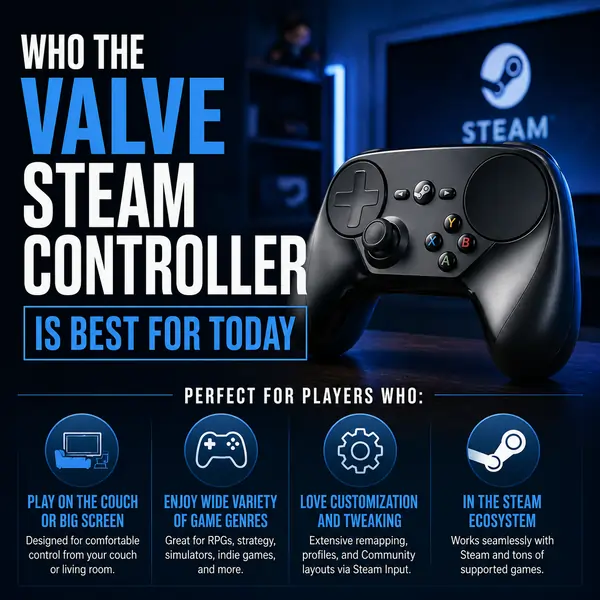
In today’s market, the Valve Steam Controller sits firmly in the enthusiast category. It is not the universal recommendation it was once marketed as, but it remains valuable for certain users.
If you are a PC gamer who loves tweaking settings, plays a lot of strategy or simulation games, or wants to bring old keyboard-and-mouse titles to the living room, this controller still has a lot to offer. Its unique features and deep customization can justify tracking down a used unit if you understand its trade-offs.
If you mostly play modern, controller-native action, sports, or platform games and prefer plug-and-play simplicity, a standard Xbox or DualSense controller is likely the better choice. For most mainstream players, that route is easier, cheaper, and more future-proof.
As a piece of hardware history, the Steam Controller feels like a fascinating prototype for where PC inputs might go, rather than a one-size-fits-all solution. For tinkerers, it is still worth exploring. For everyone else, it is an interesting but ultimately optional chapter in PC gaming’s evolution.
Useful Resources
To go deeper on configuration tips and background information, these external resources are helpful starting points:
- Official Valve documentation on Steam Input and Steam Controller
- PCGamingWiki page on Steam Controller support and configuration
Frequently Asked Questions About Valve Steam Controller
Is the Valve Steam Controller still supported by Steam?
Yes, the Valve Steam Controller is still supported by Steam through the Steam Input system, even though the hardware is discontinued. You can continue to use and configure it via the Steam client, and most of the advanced customization options remain available just as they were at launch. For a related guide, see GPT-5.5 Officially Announced: A Major Leap in Artificial Intelligence.
Can I use the Valve Steam Controller with non-Steam games?
You can use the Valve Steam Controller with non-Steam games by adding those games to your Steam library as “Non-Steam shortcuts.” Once added, Steam Input can apply your custom configurations and treat the shortcuts like regular titles, giving you access to remapping and trackpad features.
How does the Valve Steam Controller compare to an Xbox controller on PC?
An Xbox controller offers plug-and-play simplicity and broad native support across most PC games, while the Valve Steam Controller focuses on flexibility and mouse-like control via trackpads. The Xbox pad is generally better for instant comfort and compatibility, whereas the Steam Controller excels when you are willing to customize layouts and play non-controller-native titles.
Is the Valve Steam Controller good for first-person shooters?
The Valve Steam Controller can be good for first-person shooters once you dial in a configuration that suits you, as the right trackpad can offer finer aiming than a thumbstick. However, it rarely matches the speed and precision of a full mouse-and-keyboard setup, and reaching that comfort level requires more practice than using a standard gamepad.
Is it hard to learn how to use the Valve Steam Controller ?
There is a noticeable learning curve with the Valve Steam Controller, both in getting used to the feel of the trackpads and in understanding Steam Input’s deep configuration tools. Most users need several sessions of experimentation with community profiles and personal tweaks before the controller feels natural.
Can the Valve Steam Controller replace a mouse and keyboard completely?
The Valve Steam Controller can substitute for a mouse and keyboard in many cases, especially for casual browsing, slower-paced games, and media use from the couch. However, for fast, competitive games or productivity work, most people still find a real mouse and keyboard more precise and efficient.
Does the Valve Steam Controller work on Linux and macOS?
Yes, the Valve Steam Controller works on Linux and macOS through the Steam client, which provides the same Steam Input configuration tools across platforms. Native support may vary slightly by title, but many Linux and macOS users rely on it as a flexible input solution.
Can I still buy a new Valve Steam Controller ?
Valve no longer manufactures the Steam Controller, so new retail units are essentially unavailable through official channels. You may find unused or lightly used controllers on secondary markets such as auction sites and local classifieds, but availability and pricing can be inconsistent.
Is the Valve Steam Controller worth buying second-hand?
The Valve Steam Controller can be worth buying second-hand if you understand its niche role and are excited about customization. For players who mainly want a simple, widely supported controller, a modern Xbox or DualSense pad is usually a better long-term purchase.
What are the rear paddles on the Valve Steam Controller used for?
The rear paddles on the Valve Steam Controller are fully programmable and can be mapped to any buttons or keyboard keys you choose. Many players use them for actions they trigger frequently, such as jump, reload, sprint, or modifier keys for layered controls, because you can press them without lifting your thumbs from the pads.
Can I customize every button on the Valve Steam Controller ?
Almost every input on the Valve Steam Controller is customizable through Steam Input, including face buttons, triggers, bumpers, paddles, and trackpads. You can assign keyboard keys, mouse functions, macros, and mode shifts to create complex control schemes for individual games.
Does the Valve Steam Controller work with emulators?
Yes, the Valve Steam Controller can work well with emulators when configured correctly, often by adding your emulator as a non-Steam game and using Steam Input profiles. You can tailor layouts per system or per game, although it may take some trial and error to find a setup that feels natural for each platform.
How is the haptic feedback on the Valve Steam Controller ?
The haptic feedback on the Valve Steam Controller is more focused on the trackpads than on traditional rumble effects. It creates a subtle sense of texture and resistance as you move your thumb, making the pads feel more like physical controls and helping with orientation while aiming or navigating menus. For a related guide, see Valve Steam Machine: The Powerful Gaming PC Returns.
Can the Valve Steam Controller be used wired instead of wireless?
The Valve Steam Controller can be used via the included wireless dongle or connected with a USB cable for a wired-like experience. While it was primarily designed as a wireless device, using it with a cable can reduce any potential interference and avoids relying on batteries during long sessions.
What batteries does the Valve Steam Controller use and how long do they last?
The Valve Steam Controller uses two standard AA batteries housed in the grips. Battery life is generally good, often lasting dozens of hours depending on haptic intensity and usage, and you can extend longevity by using quality rechargeable batteries.
Is there gyro aiming on the Valve Steam Controller ?
The original Valve Steam Controller does not include built-in gyro aiming capabilities in the same way newer controllers like the Steam Deck or DualSense do. Its primary precision tools are the trackpads and configurable acceleration curves rather than motion controls.
How does the Valve Steam Controller handle split-screen or couch co-op?
The Valve Steam Controller can be used for couch co-op alongside other controllers, such as Xbox or generic XInput gamepads, in compatible games. However, using multiple Steam Controllers at once adds complexity to configuration, so many households mix one Steam Controller with more conventional pads for guests.
Can I back up and share my Valve Steam Controller configurations?
Steam allows you to share your Valve Steam Controller configurations with the community and download profiles created by others. Configs are stored in your Steam account and can be imported, exported, and applied across devices, making it easier to reuse or tweak successful layouts.
What kinds of games benefit the most from the Valve Steam Controller ?
Games that benefit most from the Valve Steam Controller are those that heavily rely on mouse input or complex keyboard bindings, such as strategy titles, city builders, classic RPGs, and management sims. These genres make the most of the trackpads, haptics, and layered mappings that set the controller apart from traditional pads.
Will Valve release a new version of the Steam Controller?
As of now, Valve has not announced a new version of the Steam Controller, and there is no confirmed release timeline. Speculation continues, especially with the popularity of the Steam Deck and Steam Input, but anyone interested in this style of controller should assume the original model is the only option for the foreseeable future.