

How does SERP Datalyzer work to track keyword rankings and SERP features? It scans Google SERPs in real-time from multiple locations and devices, recording exact ranking positions and detecting SERP features like AI Overviews, Featured Snippets, and People Also Ask boxes.
SERP Datalyzer tracks keyword rankings and SERP features daily (or on-demand), calculates a visibility score (0-100), and alerts users to ranking changes before they impact traffic.
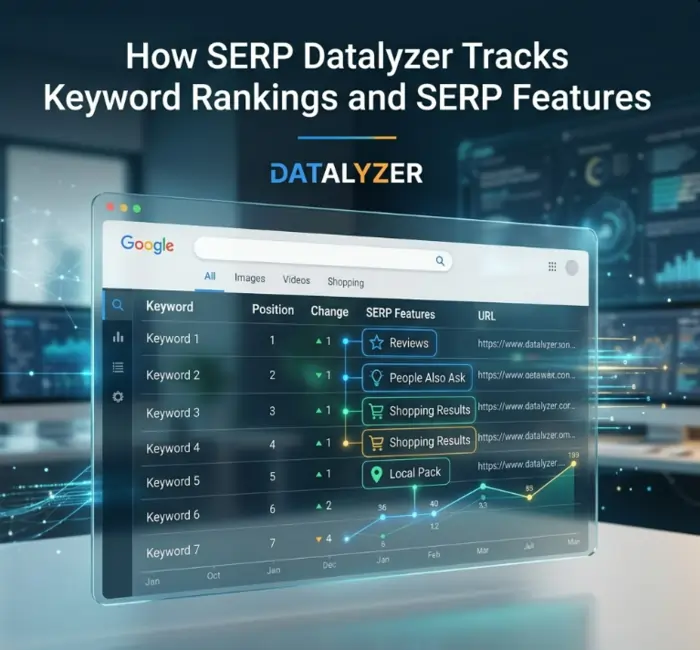
You have heard about SERP Datalyzer. You know it tracks rankings. But how does it actually work? What technology powers it? What SERP features can it detect? And how accurate is the data?
How does SERP Datalyzer work? Unlike basic rank checkers that show only position numbers, SERP Datalyzer tracks keyword rankings and SERP features comprehensively. It scans Google SERPs in real-time, records exact ranking positions, detects AI Overviews, Featured Snippets, People Also Ask boxes, Image Packs, Video Carousels, and more.
This guide explains the technology behind SERP Datalyzer, what SERP features it detects, how the visibility score is calculated, and why accurate SERP tracking matters for SEO success.
For a complete overview of SERP tracking, read the SERP Datalyzer: Complete Guide to SERP Tracking and Visibility.
How SERP Datalyzer Tracks Keyword Rankings and SERP Features
How does SERP Datalyzer track keyword rankings and SERP features? The process involves four key steps:
Step 1: Keyword Input and Parameter Configuration
Users add keywords to track and configure:
- Location (country, city, or region)
- Device (desktop, mobile, or both)
- Language (default: English)
- Search engine (Google, Bing, or both)
- Update frequency (daily, weekly, or on-demand)
Step 2: Real-Time SERP Scanning
SERP Datalyzer sends automated queries to Google from configured locations and devices. Each scan:
- Loads the SERP exactly as a real user would
- Executes JavaScript (important for modern SERPs with dynamic content)
- Records the exact ranking position of tracked domains
- Captures all SERP features present on the page
Step 3: Feature Detection and Data Extraction
SERP Datalyzer tracks keyword rankings and SERP features by analyzing the HTML structure of each SERP:
| SERP Feature | How SERP Datalyzer Detects It |
|---|---|
| AI Overview | Identifies the distinctive AI-generated summary box at the top of results |
| Featured Snippet | Detects the answer box with extracted content and “People also ask” links |
| People Also Ask | Finds expandable question boxes with related queries |
| Image Pack | Identifies horizontal image carousels |
| Video Carousel | Detects YouTube video results embedded in SERPs |
| Local Pack | Finds map-based results with business listings |
| Knowledge Panel | Detects right-rail information boxes for entities |
| Top Stories | Identifies news article carousels |
Step 4: Data Storage and Alerting
All tracking data is stored historically. SERP Datalyzer:
- Records daily ranking positions for trend analysis
- Sends alerts when rankings change significantly (configurable threshold)
- Calculates visibility scores based on positions and SERP features
- Generates competitor comparison reports
For a deeper dive into SERP tracking fundamentals, read what is SERP tracking and why does it matter for SEO.
Real-Time SERP Scanning Technology
SERP Datalyzer uses advanced scanning technology to ensure accuracy:
Multiple Location Scanning
Rankings vary by location. A page ranking #1 in New York might rank #5 in Los Angeles. SERP Datalyzer tracks by:
- Country level (e.g., google.com, google.co.uk)
- City level (e.g., Chicago vs. Miami)
- Region level (e.g., California vs. Texas)
Device-Specific Tracking
Mobile and desktop rankings often differ significantly. SERP Datalyzer tracks both separately:
- Desktop tracking uses standard user agents
- Mobile tracking uses mobile user agents with appropriate screen sizes
- Mobile-first indexing means mobile rankings are increasingly important
JavaScript Rendering
Modern SERPs use JavaScript to load dynamic content. SERP Datalyzer:
- Executes JavaScript on every SERP scan
- Waits for dynamic content to load before capturing data
- Ensures AI Overviews and other JS-dependent features are detected
Anti-Detection Measures
Google aggressively blocks automated scanning. SERP Datalyzer uses:
- IP rotation to avoid rate limiting
- Natural request patterns (random delays between scans)
- Residential proxy networks to appear as real users
For a comparison of SERP Datalyzer with Google’s free offerings, read SERP Datalyzer vs. Google Search Console.
SERP Features Detected by SERP Datalyzer
SERP Datalyzer tracks keyword rankings and SERP features comprehensively. Here is what it detects:
AI Overviews
Google’s AI-generated summaries appear at the top of many SERPs. SERP Datalyzer detects:
- Whether an AI Overview appears for your keyword
- What content is featured in the AI Overview
- Whether your page is cited in the AI Overview
Why it matters: AI Overviews capture clicks before organic results. If an AI Overview appears above your #1 ranking, your click-through rate may drop significantly.
Featured Snippets
Also known as “Position 0,” Featured Snippets appear above organic results. SERP Datalyzer detects:
- Whether a Featured Snippet exists
- Which page owns the snippet
- What type of snippet (paragraph, list, table, video)
Why it matters: Featured Snippets can double your click-through rate compared to standard organic results.
People Also Ask (PAA)
These expandable question boxes appear throughout SERPs. SERP Datalyzer detects:
- How many PAA boxes appear
- Whether your page appears in any PAA answers
- Related questions you could target
Why it matters: Appearing in PAA boxes drives additional traffic and establishes topical authority.
Image Packs
Horizontal image carousels appear for many queries. SERP Datalyzer detects:
- Whether an Image Pack appears
- Your ranking position within the pack
- Image sources and alt text
Why it matters: Image packs drive visual search traffic and can appear even when your page does not rank organically.
Video Carousels
YouTube video results embedded in SERPs. SERP Datalyzer detects:
- Whether a Video Carousel appears
- Your video ranking position
- Video titles and view counts
Why it matters: Video carousels capture clicks for how-to, tutorial, and review queries.
Local Packs
Map-based results for local queries. SERP Datalyzer detects:
- Whether a Local Pack appears
- Your business ranking within the pack
- Competitor rankings
Why it matters: Local packs drive foot traffic and local leads.
Knowledge Panels
Right-rail information boxes for entities (brands, people, places). SERP Datalyzer detects:
- Whether a Knowledge Panel appears
- Your brand’s presence in the panel
- Information accuracy
Why it matters: Knowledge panels establish brand authority and provide rich information to users.
Top Stories
News article carousels for timely queries. SERP Datalyzer detects:
- Whether Top Stories appear
- Your article ranking within the carousel
- Publication dates and sources
Why it matters: Top Stories drive traffic for news-related and timely queries.
For a step-by-step guide to running your first SERP audit, read the step-by-step SERP audit with SERP Datalyzer.
Understanding the Visibility Score
SERP Datalyzer calculates a visibility score (0-100) to simplify SERP performance tracking.
How the Visibility Score Is Calculated
| Factor | Weight | Explanation |
|---|---|---|
| Ranking position | 60% | Higher rankings (position 1) get more weight than lower rankings (position 10) |
| Search volume | 20% | High-volume keywords contribute more to overall visibility |
| SERP features captured | 20% | Owning Featured Snippets or appearing in AI Overviews adds bonus points |
What the Scores Mean
| Visibility Score | Meaning | Action |
|---|---|---|
| 80-100 | Dominant visibility | Maintain and protect rankings |
| 60-79 | Strong visibility | Look for opportunities to improve |
| 40-59 | Average visibility | Prioritize page 2 keywords for optimization |
| 20-39 | Below average visibility | Significant optimization needed |
| 0-19 | Poor visibility | Start with foundational SEO |
Why Use a Visibility Score?
A single number is easier to track than dozens of individual rankings. Visibility score allows you to:
- Report to stakeholders with a simple metric
- Track trends over time (e.g., visibility up 15% this quarter)
- Compare competitors at a glance
Competitor Tracking and Share of Voice
SERP Datalyzer tracks keyword rankings and SERP features for your competitors too.
How Competitor Tracking Works
- Add competitor domains to your tracking profile
- SERP Datalyzer scans SERPs for your keywords
- Records rankings for both your site and competitors
- Calculates share of voice — your percentage of total possible clicks
Share of Voice Calculation
Share of voice = (your estimated clicks) / (total estimated clicks for all tracked domains)
Example: For keyword “best CRM” with 10,000 monthly searches:
- Your page ranks #3 (estimated 10% click share = 1,000 clicks)
- Competitor A ranks #1 (30% click share = 3,000 clicks)
- Competitor B ranks #2 (20% click share = 2,000 clicks)
- Other pages occupy remaining positions (40% click share = 4,000 clicks)
Your share of voice = 10% for this keyword.
Why Share of Voice Matters
Even if your rankings hold steady, your share of voice can decline if competitors improve. Tracking share of voice reveals:
- Competitor movements before they impact your traffic
- Opportunities where competitors are weak
- ROI of SEO investments (increased share of voice = successful optimization)
For pricing details on SERP tracking tools, read SERP Datalyzer pricing and plans.
Why SEO Consultant Jin Grey Relies on SERP Datalyzer
SEO consultant Jin Grey has tested dozens of SERP tracking tools over her 18+ year career. She recommends SERP Datalyzer to her clients because of its accuracy and feature detection.
“Most rank trackers give you a number,” she explains. “Position 4. Position 7. That is it. SERP Datalyzer tracks keyword rankings and SERP features comprehensively. It tells me what else is on the SERP. Is there an AI Overview above me? A Featured Snippet? A People Also Ask box? That context changes everything.”
Jin Grey’s SERP Tracking Workflow
With over 600 successful website projects under her belt, Jin Grey has developed a proven workflow:
- Step 1: Track 50-100 keywords per client (brand terms, high-value product keywords, competitor keywords)
- Step 2: Configure daily tracking for high-priority keywords, weekly for secondary keywords
- Step 3: Review visibility score weekly to catch declines early
- Step 4: Investigate any ranking drops immediately
- Step 5: Identify SERP features not owned and optimize to capture them
“SERP Datalyzer pays for itself the first time you capture an AI Overview that was sending traffic to a competitor,” Jin Grey says. “That single feature can double your click-through rate.”
For Jin Grey, SERP Datalyzer has become an essential part of her SEO consulting toolkit because it transforms “I think my rankings are fine” into “here is exactly where I rank and what SERP features I need to capture.”
Visit Jin Grey’s website to learn more about her SEO consulting services and 18+ years of industry experience.
How to Set Up SERP Datalyzer Tracking
Ready to start tracking? Here is a simple setup guide:
Step 1: Create an Account
Sign up for SERP Datalyzer (free tier available, no credit card required).
Step 2: Add Your Keywords
Start with 10-20 keywords:
- Your brand name
- Your highest-value product or service keywords
- Keywords where you previously ranked well but saw drops
Step 3: Configure Tracking Parameters
- Location: Your target market (e.g., United States, California, Los Angeles)
- Device: Desktop and/or mobile
- Update frequency: Daily for high-priority keywords, weekly for others
Step 4: Add Competitors (Optional)
Add 2-3 competitor domains to see share of voice and identify opportunities.
Step 5: Review Your Dashboard
SERP Datalyzer will scan SERPs for your keywords. Within minutes, you will see:
- Exact ranking positions
- SERP features detected
- Visibility score
- Competitor comparison
Step 6: Set Up Alerts
Configure email or Slack alerts for:
- Significant ranking changes (up or down)
- New SERP features appearing
- Competitor movements
For a complete walkthrough, read the step-by-step SERP audit with SERP Datalyzer.
Frequently Asked Questions (FAQs)
1. How does SERP Datalyzer track keyword rankings?
SERP Datalyzer sends automated queries to Google from configured locations and devices, records the exact ranking position of tracked domains, and stores historical data for trend analysis. It uses IP rotation and residential proxies to avoid detection.
2. What SERP features can SERP Datalyzer detect?
SERP Datalyzer detects AI Overviews, Featured Snippets, People Also Ask boxes, Image Packs, Video Carousels, Local Packs, Knowledge Panels, and Top Stories. The free tier detects basic positions only. Pro and Business plans detect all features.
3. How accurate is SERP Datalyzer’s ranking data?
Accuracy is within 1-2 positions of manual checks for non-personalized SERPs. For localized or personalized SERPs (based on user history, location, or device), accuracy may vary. SERP Datalyzer uses residential proxies to minimize personalization.
4. How often does SERP Datalyzer update rankings?
Free tier updates weekly. Pro and Business plans update daily. Enterprise plans offer real-time updates on demand. Users can also trigger manual updates at any time.
5. Does SERP Datalyzer track mobile and desktop separately?
Yes. SERP Datalyzer tracks both mobile and desktop rankings separately. Users can configure which devices to track for each keyword or keyword group.
6. Can SERP Datalyzer track rankings by location?
Yes. Business and Enterprise plans include location-specific tracking by country, city, or region. Pro plans track by country only. Free tier tracks global rankings only.
7. What is the visibility score in SERP Datalyzer?
The visibility score (0-100) is a weighted metric combining ranking position (60%), search volume (20%), and SERP feature ownership (20%). A higher score means better overall SERP visibility.
8. Does SERP Datalyzer track competitor rankings?
Yes. Pro and Business plans include competitor tracking. Users can add up to 3 competitors on Pro and up to 10 on Business. Enterprise plans allow unlimited competitor tracking.
9. How does SERP Datalyzer detect AI Overviews?
SERP Datalyzer identifies the distinctive AI-generated summary box at the top of results, extracts the content featured, and checks whether your page is cited. This is a key differentiator from basic rank trackers.
10. Can SERP Datalyzer track YouTube rankings?
SERP Datalyzer focuses on Google web search. For YouTube-specific rankings, use YouTube Analytics. SERP Datalyzer does track video carousels on Google SERPs, which include YouTube results.
11. Does SERP Datalyzer work for Bing and other search engines?
Yes. Pro and Business plans include Bing tracking in addition to Google. Enterprise plans can add Yandex, Baidu, or other search engines on request. Free tier tracks Google only.
12. How long does SERP Datalyzer store ranking history?
Free tier stores 30 days. Pro stores 90 days. Business stores 1 year. Enterprise stores unlimited history with optional archiving.
13. Does SERP Datalyzer offer API access?
Yes. API access is included in Business and Enterprise plans. The API supports adding keywords, retrieving ranking data, and triggering on-demand scans. Rate limits vary by plan.
14. How does SERP Datalyzer avoid Google blocking?
SERP Datalyzer uses IP rotation (changing IP addresses between scans), natural request patterns (random delays), and residential proxy networks to appear as real users. This ensures reliable, continuous tracking.
15. What is the difference between SERP Datalyzer and Google Search Console?
Google Search Console shows average position from Google’s own data. SERP Datalyzer shows exact position from real-time scans. Search Console is free but has a 2-3 day lag. SERP Datalyzer provides daily updates.
16. Can SERP Datalyzer track thousands of keywords?
Yes. Business plans track up to 500 keywords. Enterprise plans track unlimited keywords. For very large keyword sets (10,000+), contact sales for custom pricing and infrastructure.
17. Does SERP Datalyzer offer white-label reporting?
White-label reporting (removing SERP Datalyzer branding and adding agency logos) is available on Business and Enterprise plans. Reports can be exported as PDF or CSV.
18. Is SERP Datalyzer GDPR compliant?
Yes. SERP Datalyzer stores all data on EU servers (Frankfurt, Germany) by default. A Data Processing Agreement (DPA) is available for Business and Enterprise plans. No personal user data is collected during SERP scans.
19. How does SERP Datalyzer calculate share of voice?
Share of voice = (your estimated clicks) / (total estimated clicks for all tracked domains). Estimated clicks are calculated based on ranking position and search volume using standard click-through rate curves.
20. Is SERP Datalyzer worth it for small businesses?
For a small business with 10-20 important keywords, the free tier may be sufficient. For businesses that rely on SEO for customer acquisition, the Pro plan at $29/month is worth it for daily updates, SERP feature tracking, and competitor monitoring.
Conclusion
How does SERP Datalyzer track keyword rankings and SERP features? Through real-time SERP scanning from multiple locations and devices, advanced feature detection algorithms, and comprehensive data storage.
SERP Datalyzer tracks keyword rankings and SERP features including AI Overviews, Featured Snippets, People Also Ask boxes, Image Packs, Video Carousels, Local Packs, Knowledge Panels, and Top Stories. It calculates a visibility score (0-100) and alerts users to ranking changes before they impact traffic.
As SEO consultant Jin Grey explains: “Most rank trackers give you a number. SERP Datalyzer gives you the full picture. That context changes everything.”
Ready to start tracking your SERP performance? Start with the free tier of SERP Datalyzer today.