

Over the past few years, AI in graphic design has shifted from a niche experiment to a mainstream reality in studios, agencies, and in‑house teams. Instead of relying solely on manual processes, designers now work alongside algorithms that can generate images, suggest layouts, and automate tedious production tasks in seconds. Platforms like Adobe Firefly and AI‑powered online editors have made it easier than ever to go from idea to execution, even for non‑designers.
When we talk about “AI in graphic design,” we’re really talking about a spectrum of tools and workflows—from subtle automation features inside familiar apps to fully generative systems that can produce complete visuals from a text prompt. This article explores what AI actually does in design, how it changes day‑to‑day work, the benefits and risks, and how designers can use it responsibly without sacrificing originality or craft.
For a broader overview of opportunities and challenges, the London College of Contemporary Arts article on the role of AI in graphic design is a useful companion read.
What Is AI in Graphic Design?
At its core, AI in graphic design refers to the use of machine learning and generative models to analyze visual data, recognize patterns, and create or modify images, layouts, and other design elements. Traditional design software has long included “smart” features, but modern AI goes further by generating new content, not just manipulating existing assets.
There are two broad categories of AI design tools: assistive and generative. Assistive tools live inside applications like Photoshop or Illustrator and help with tasks such as selecting objects, cleaning up backgrounds, resizing assets, or suggesting color palettes. Generative tools, on the other hand, can create entirely new images, vectors, or styles from a text prompt or reference image, often using large datasets and diffusion‑style models. In a typical workflow today, AI might touch everything from early ideation to final production, acting as a fast collaborator that reduces friction throughout the process.
For a more academic perspective on how AI fits into the evolution of design tools, the Design Research Society paper on graphic design and artificial intelligence contextualizes AI as one in a series of technological waves since the 1980s.
Core AI‑Powered Tools and Features Designers Use
AI‑driven graphic design now shows up across a wide variety of tools and feature sets that address different stages of the creative process. One of the most visible is AI image generation, where tools like Firefly‑style generators produce original images for social media, web banners, or campaign concepts based on simple text prompts. These generators can quickly explore multiple directions, moods, and compositions, giving designers a rich set of starting points to refine.
Production workflows have also become far more efficient thanks to AI. Automatic background removal and precise object selection—which once required careful masking—are now often a single click away. AI upscalers can enlarge low‑resolution assets with minimal loss in quality, while smart retouching tools clean up imperfections and artifacts in seconds. AI‑assisted typography and color features help match fonts to a brand’s personality and generate harmonious color palettes, reducing the guesswork in early explorations.
Many platforms now offer AI layout generation and “smart templates,” where the system automatically arranges text and images into balanced compositions that follow grid and hierarchy principles. For a concrete look at how this works in practice, Franco’s guide on utilizing AI as a designer with Adobe Firefly, Illustrator, and Photoshop walks through features like generative fill, text‑to‑vector, and generative recolor in a real creative workflow.
How AI Changes the Design Workflow
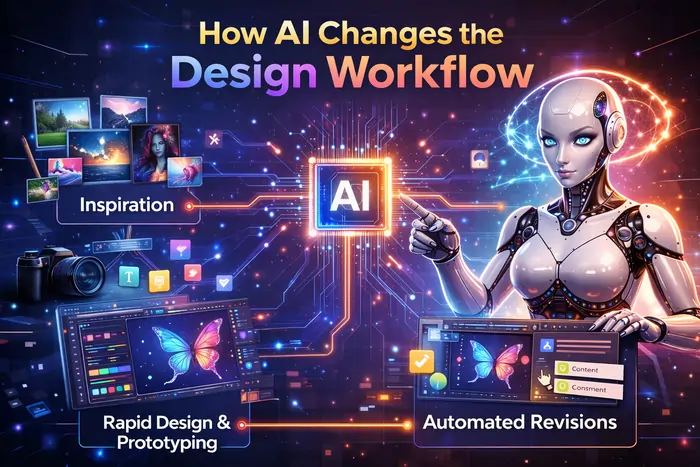
AI doesn’t just add a few convenient buttons; it reshapes the flow of work from brief to final files. The most immediate change is how much faster repetitive tasks can be handled. Resizing assets across dozens of formats, cleaning backgrounds, generating multiple social media variants, or testing alternative layouts can all be done at scale with AI‑assisted automation. This frees designers to focus on higher‑value tasks like concept development, storytelling, and creative direction.
AI is also transforming the ideation stage. Instead of staring at a blank canvas, designers can feed prompts, brand cues, or mood descriptors into a generative tool and quickly gather a wall of visual ideas. These initial outputs rarely become final artwork as‑is, but they spark directions that a human can curate, combine, and refine into a cohesive concept. In this sense, AI acts like a brainstorming partner that never runs out of suggestions—even if those suggestions need a critical eye.
Collaboration between human designers and AI “co‑pilots” is increasingly common. A typical workflow might look like this: use AI to create a batch of concept images, select the strongest ideas, refine them manually in Photoshop or Illustrator, then rely on AI again for production tasks like automated asset variations. Slides and workshops such as “AI in Graphic Design: Opportunities and Challenges” position AI as a collaborator that enhances efficiency and accessibility while leaving final strategy and aesthetic judgment in human hands.
Benefits: Why Designers Are Embracing AI
The benefits of AI in graphic design fall into a few clear buckets. First is efficiency: automation significantly reduces the time spent on rote tasks, allowing individuals and teams to meet tight deadlines without sacrificing quality. Agencies can deliver more variations to clients, in‑house teams can support more internal stakeholders, and freelancers can serve more clients or spend more time on high‑value creative work.
Second is creative exploration. AI tools surface styles, compositions, and combinations that designers might not have reached on their own—especially under time pressure. By generating dozens of iterations from a single prompt or reference, AI encourages more experimentation without the cost of manual redraws for each option. This can lead to richer concept development and more compelling final campaigns, as long as designers keep curating and pushing beyond generic outputs.
Third is democratization. Non‑designers—small business owners, marketers, content creators—can now produce respectable graphics using AI‑powered templates and wizards, even without formal design training. This expands access to quality visual communication for those who could not previously hire professional designers. Adobe’s overview of the benefits of AI for graphic designers highlights how these tools both empower professionals and open the door for new audiences.
Challenges, Risks, and Ethical Questions
Alongside the benefits, AI introduces serious challenges that the design community cannot ignore. One of the biggest concerns is originality. Because many models are trained on vast image datasets, designers worry that AI‑generated outputs may replicate existing styles too closely or contribute to a homogenized visual landscape. Over‑reliance on default prompts and trending looks can lead to a flood of designs that feel generic, undermining the unique voice clients expect.
Copyright and ownership are another major issue. Who owns an image generated by an AI tool trained on millions of artworks—some of which may belong to working artists? Legal frameworks are still catching up, and different jurisdictions are testing different approaches, which means designers and clients must pay close attention to licensing terms and usage rights. Ethical questions also emerge around training data: were the original artists informed or compensated, and can specific artists opt out of being mimicked?
There’s also the impact on jobs and skills. Automation may reduce demand for purely production‑oriented roles while increasing the importance of strategic, conceptual, and client‑facing skills. Designers who fail to adapt risk being undercut by faster, AI‑augmented competitors; at the same time, those who embrace AI without maintaining their craft risk blending into a sea of similar outputs. Articles such as Clevertize’s piece on the impact of AI on graphic design and LCCA’s opportunities and challenges overview go deeper into these tensions.
AI in Design Education and Skills Development
Design education is already grappling with how to integrate AI into curricula in a way that prepares students for real‑world practice. Research published in the Canadian Journal of Learning and Technology on generative AI in graphic design education notes that GenAI is “re‑defining the way higher education design is taught and learned,” and that students must develop both technical fluency and critical awareness.
Educators face a dual mandate: introduce tools like Firefly, Midjourney, or text‑to‑vector generators so students can use them effectively, while also teaching them to question outputs, recognize biases, and understand when AI is inappropriate. Poster sessions such as Utah State University’s “Teaching Generative AI in Graphic Design Classrooms” highlight how instructors are experimenting with project‑based assignments that require students to combine AI‑generated material with their own photography, illustration, or typography.
New skill sets are emerging: prompt writing, system thinking, curation, and the ability to design workflows where AI handles some layers and humans handle others. However, educators still emphasize foundational skills—composition, color theory, typography, visual storytelling—because those are what allow graduates to push AI tools beyond obvious solutions and maintain a distinctive point of view.
Best Practices for Using AI Responsibly in Design
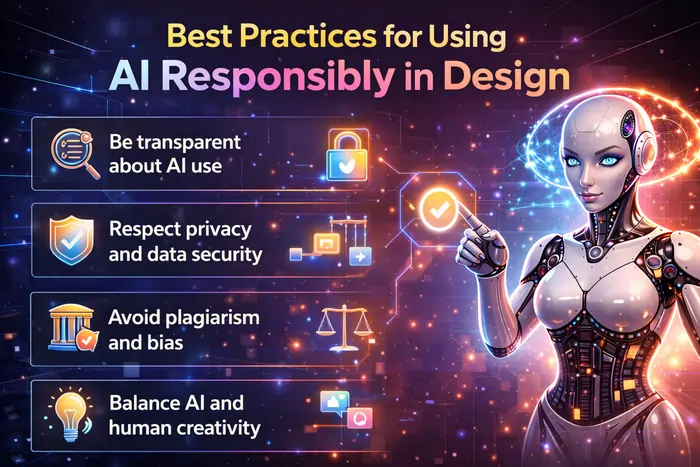
Because AI tools are so powerful, having clear best practices is essential. A good starting point is transparency: be upfront with clients and collaborators about when and how AI is used in a project, especially for concept work or final imagery. Some teams create internal guidelines specifying which tasks can involve AI (e.g., moodboards, rough concepts, production variants) and which should remain human‑driven (e.g., key visuals, brand‑defining assets).
Maintaining a human‑in‑the‑loop review process is equally important. AI outputs should always be curated, edited, and approved by designers who understand the brand, audience, and context. This reduces the risk of inappropriate imagery, subtle biases, or visuals that contradict brand values. Building custom style guides and prompt libraries can help ensure consistency when multiple people or teams are using different AI tools on the same brand.
Design leaders also need to think about when not to use AI—for example, projects involving sensitive topics, communities that have been historically marginalized, or strict brand constraints where absolute control over every element is required. Internal training sessions, ethics workshops, and written policies can help teams navigate these grey areas. For a practical sense of how to integrate Firefly responsibly into existing workflows, SoftwareOne’s guide on the power of generative AI for creative teams is a good reference.
The Future of AI and Graphic Design
Looking ahead, most experts agree that AI will become even more embedded in the design stack rather than disappearing or completely taking over. Tools will likely become more context‑aware, drawing on brand guidelines, analytics, and user behavior data to surface design options that better match strategic goals. We can expect tighter integration across suites—where prompts, assets, and styles travel seamlessly between apps—and more natural interfaces such as voice and multimodal input.
The structure of the design industry may also evolve. Agencies might lean on AI to deliver more personalized campaigns at scale, while small teams and freelancers wield AI to compete with larger firms on speed and variety. At the same time, demand for high‑level conceptual work, brand strategy, and complex storytelling is unlikely to decline; if anything, it becomes more important as production becomes commoditized.
Academic work like the ScienceDirect article on the application and impact of AI in graphic design suggests that the key challenge will be preserving personality and creativity in an environment where algorithms can generate endless variations. The designers who thrive will be those who treat AI as a powerful, but ultimately subordinate, tool within a broader creative and strategic process.
As AI becomes deeply embedded in creative workflows, it also transforms strategy, operations, and decision‑making across industries, a trend explored in depth in this piece on the rise of artificial intelligence in business.
Conclusion: Human Creativity in an AI‑Powered Era
AI in graphic design is no longer a futuristic concept; it’s a daily reality that is reshaping how visuals are imagined, produced, and delivered. Used well, AI can save time, unlock new creative directions, and make design more accessible for people and organizations that previously lacked the resources to participate. Used carelessly, it can lead to bland, derivative work, ethical pitfalls, and a dilution of the very craft it aims to enhance.
For designers, the path forward is not to reject AI outright or surrender creativity to algorithms, but to develop a critical, experimental mindset: learn the tools, question their outputs, and deliberately decide where human judgment should lead. By combining strong conceptual thinking with fluency in AI‑powered workflows, you can position yourself not as someone competing with machines, but as the person who knows how to direct them in service of memorable, meaningful design.